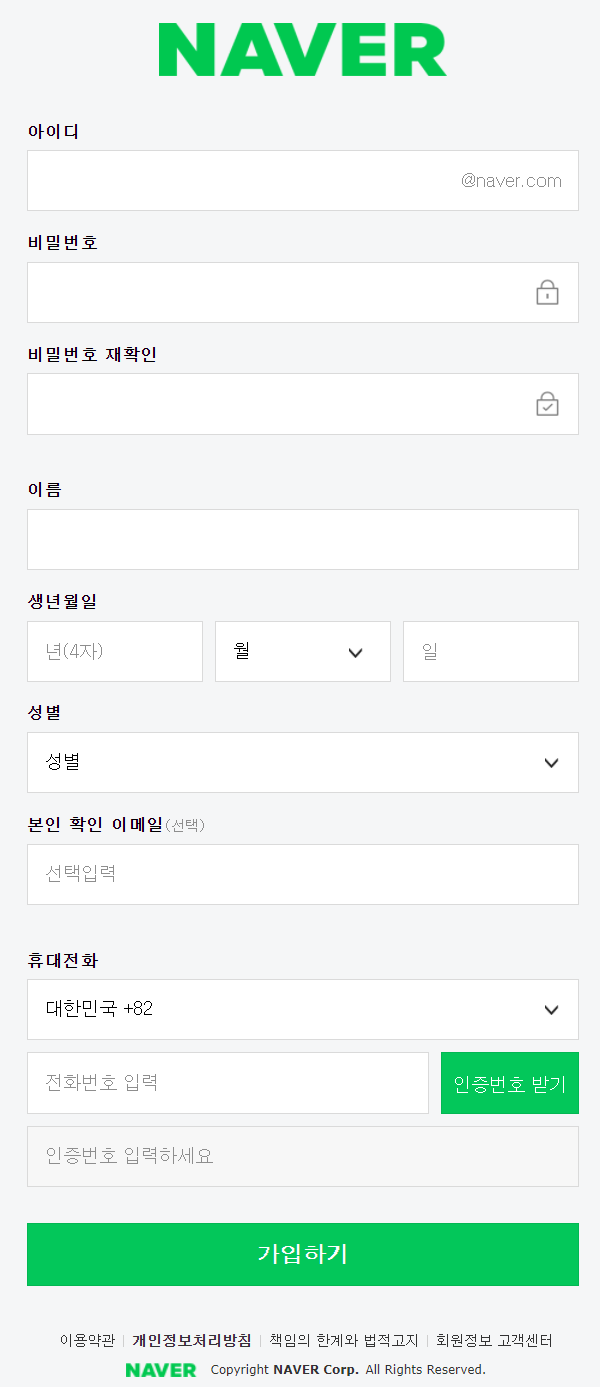

<form> 웹 페이지의 입력 양식- 로그인창, 회원가입 폼
<label> 폼의 양식에 이름 붙이는 태그
주요속성 for. label의 for의 값과 양식의 id값이 같으면 연결 됨
label을 클릭하면 연결된 양식에 입력할 수 있도록 하거나 체크하거나 해제함
<input> 태그의 required 속성은 폼 데이터(form data)가 서버로 제출되기 전 반드시 채워져 있어야 하는 입력 필드를 명시합니다.
<!DOCTYPE html>
<html lang="ko" dir="ltr">
  <head>
    <meta charset="utf-8">
    <title>회원가입 step 2</title>
  </head>
  <body>
    <h1>NAVER</h1>
    <form>
      <table>
        <tr>
          <td>
            <h3>
              <label for="id">아이디</label>
            </h3>
            <input type="text" id="id" name="id" required>
            <!--input에 반드시 있어야 하는 속성 required -->
          </td>
        </tr>
        <tr>
          <td>
            <h3>
              <label for="pw">비밀번호</label>
            </h3>
            <input type="password" id="pw" name="pw" required>
          </td>
        </tr>
        <tr>
          <td>
            <h3>
              <label for="rpw">비밀번호 재확인</label>
            </h3>
            <input type="password" id="rpw" name="rpw" required>
          </td>
        </tr>
        <tr>
          <td>
            <label for="user_name">이름</label>
          </td>
          <input type="text" id="user_name" name="user_name">
        </tr>
        <tr>
          <td>
            <h3>
              <label for="year">생년월일</label>
            </h3>
            <div class="input-group">
              <input type="text" id="year" name="year" maxlength="4" size="10" placeholder="년(4자)">
              <!-- 입력칸에 글자를 띄어두고 싶을때 placeholder사용
                  size는 칸의 크기 -->
              <select id="month" name="month">
                <option value="월">월</option>
                <option value="1">1</option>
                <option value="2">2</option>
                <option value="3">3</option>
                <option value="4">4</option>
                <option value="5">5</option>
                <option value="6">6</option>
                <option value="7">7</option>
                <option value="8">8</option>
                <option value="9">9</option>
                <option value="10">10</option>
                <option value="11">11</option>
                <option value="12">12</option>
              </select>
              <input type="text" id="date" name="date">
            </div>
          </td>
        </tr>
        <tr>
          <td>
            <h3>
              <label for="gender">성별</label>
            </h3>
            <select id="gender" name="gender">
              <option value="none">성별</option>
              <option value="female">여자</option>
              <option value="male">남자</option>
              <option value="nogender">선택안함</option>
            </select>
          </td>
        </tr>
        <tr>
          <td>
            <h3>
              <label for="email">본인확인 이메일 <span class="select-option">(선택)</span>
              </label>
            </h3>
            <input type="email" id="email" name="email" placeholder="선택입력">
          </td>
        </tr>
        <tr>
          <td>
            <h3>
              <label for="tel">휴대전화</label>
            </h3>
          <ul>
            <li>
              <select id="local-number" name="local-number">
                <option value="+82" selected>대한민국 +82</option>
                <!-- selected를 적으면 이 값이 보이게 됨 -->
                <option value="+30">그리스 +30</option>
                <option value="+224">기니 +224</option>
                <option value="+264">나미비아 +264</option>
              </select>
            </li>
            <li>
              <input type="tel" id="phone" name="phone" pattern="[0-9]{3}-[0-9]{4}-[0-9]{4}" placeholder="전화번호 입력">
              <button type="button">인증번호 받기</button>
            </li>
            <li>
              <input type="text" id="auth-num" name="auth-num" maxlength="4" placeholder="인증번호를 입력하세요" disabled>
              <!-- disalbed속성을 걸면 그 칸을 선택하지 못함 -->
            </li>
          </ul>
          </td>
        </tr>
      </table>
      <button type="submit">가입하기</button>
    </form>
    <footer>
      <table>
      <tr>
        <td><a href="#">이용약관</a></td>
        <td><a href="#">
           <strong>개인정보처리방침</strong>
        </a></td>
        <td><a href="#">책임의 한계와 법적고지</a></td>
        <td><a href="#">회원정보 고객센터</a></td>
      </tr>
        </table>
      NAVER Copyright NAVER Corp. All Rights Reserved.
    </footer>
  </body>
</html>'FRONT > HTML' 카테고리의 다른 글
| HTML | 네이버 회원가입 폼 구현하기 1 (0) | 2022.03.21 |
|---|
