이전에 간단하게 은행업무를 구현한 프로젝트가 있는데
https://github.com/2songyi/song_bank
GitHub - 2songyi/song_bank: 은행 시스템을 구현한 프로젝트 SongBank입니다.
은행 시스템을 구현한 프로젝트 SongBank입니다. Contribute to 2songyi/song_bank development by creating an account on GitHub.
github.com
바로 이 프로젝트입니다!
간단하게 만들어서 리팩토링하기 딱 좋다는 생각이 들었고
사용하지 않았던 기술들을 하나씩 공부하며 적용 할 예정입니당
가장 먼저 비밀번호에 암호화를 적용해볼것이고 사용할 기술은 Spring Security!
DB에서 암호화하지 않고 스프링시큐리티를 사용해서 암호화한 이유는
1. 가장 큰것은 복잡하지 않다는것
2. 기능의 확장에 용이하다는것
그래서 Spring으로 암호화, 복호화를 진행할 예정입니다.
1. pom.xml에 dependency삽입
		<!--스프링시큐리티 web 라이브러리-->
        <dependency>
            <groupId>org.springframework.security</groupId>
            <artifactId>spring-security-web</artifactId>
            <version>5.0.6.RELEASE</version>
        </dependency>
        <!--스프링시큐리티 core 라이브러리-->
        <dependency>
            <groupId>org.springframework.security</groupId>
            <artifactId>spring-security-core</artifactId>
            <version>5.0.6.RELEASE</version>
        </dependency>
        <!--스프링시큐리티 config 라이브러리-->
        <dependency>
            <groupId>org.springframework.security</groupId>
            <artifactId>spring-security-config</artifactId>
            <version>5.0.6.RELEASE</version>
        </dependency>
        <!-- https://mvnrepository.com/artifact/org.springframework.security/spring-security-taglibs -->
		<dependency>
			<groupId>org.springframework.security</groupId>
			<artifactId>spring-security-taglibs</artifactId>
			<version>5.0.6.RELEASE</version>
		</dependency>
버전을 맞춰주는것은 필수입니다.
2. spring-security.xml 생성
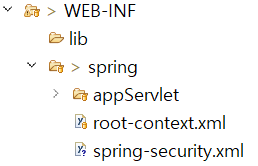
위치는 이렇게 /WEB-INF/spring/spring-security.xml 가 되도록 생성하면 됩니다.
<?xml version="1.0" encoding="UTF-8"?>
<beans:beans xmlns="http://www.springframework.org/schema/security"
    xmlns:beans="http://www.springframework.org/schema/beans" xmlns:xsi="http://www.w3.org/2001/XMLSchema-instance"
    xsi:schemaLocation="http://www.springframework.org/schema/beans
                                http://www.springframework.org/schema/beans/spring-beans.xsd
                                http://www.springframework.org/schema/security
                                http://www.springframework.org/schema/security/spring-security.xsd">

    <beans:bean id="bcryptPasswordEncoder"
        class="org.springframework.security.crypto.bcrypt.BCryptPasswordEncoder" />

</beans:beans>
비밀번호 문서를 위해 bean을 추가하는 작업입니다.
여기 나와있는 bcryptPasswordEncoder는 비밀번호 암호화 메서드, 인코딩 된 비밀번호를 비교해주는 역할하는 클래스입니다.
3. web.xml 에 추가하기
	<context-param>
		<param-name>contextConfigLocation</param-name>
		<param-value>
			/WEB-INF/spring/root-context.xml
			/WEB-INF/spring/spring-security.xml
		</param-value>
</context-param>param-value속 두번째줄을 추가해줬습니다
이 과정이 끝나면 maven project update를 진행해줘야합니다.
<프로젝트에 적용>
회원가입시 DB에 저장되는 비밀번호에 암호화를 적용해봤습니다.
	 // 고객 회원가입
	public void addCustomer(CustomerCommand customer) {
		// 암호화
		String encodePasswd = passwordEncoder.encode(customer.getPasswd());
		customer.setPasswd(encodePasswd);
		customerDao.addCustomer(customer);
	}

	// 로그인시 유저 체크
	public boolean checkUser(String userId, String passwd) {

		String encodePW = getEncodePW(userId);

		if (passwordEncoder.matches(encodePW, passwd)) {
			return true;
		} else {
			return false;
		}

	}

	// 암호화된 비밀번호 찾기
	public String getEncodePW(String userId) {
		return customerDao.getEncodePW(userId);
	}
기존 코드 : 로그인을 위해 입력된 정보를 customer객체에 담아 전체를 비교
수정 코드 : 입력받은 userId로 암호화된 passwd를 DB에서 꺼내와 입력된 passwd와 비교
암호화passwd와 입력 passwd를 비교한 후 그 결과를 boolean으로 controller에 전달!
이번 리팩토링을하며 더 손봐야할 부분들이 수두룩빽뺵.. 발견되었네요